Preserve your priceless memories and mementos with the Memory Lab.
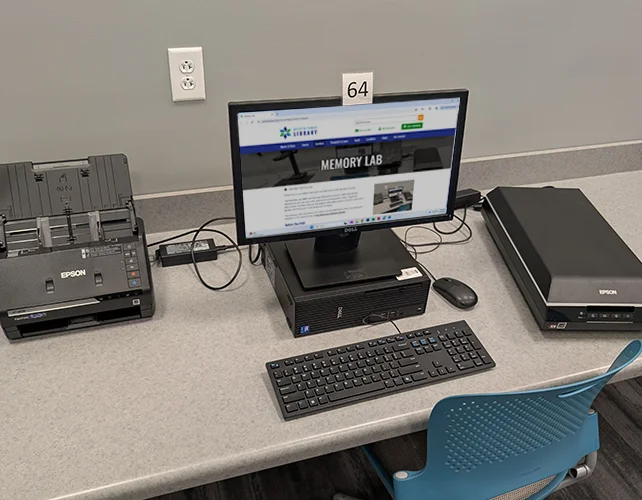
The Memory Lab offers self-directed digitization stations. With easy-to-use equipment, you can scan, edit, and restore photographs, slides, negatives, documents, and film. You can also digitize VHS tapes, audio cassettes, and more—giving new life to your most treasured moments.
The Memory Lab is located in the Edward & Elizabeth Burns Historical Research Pavilion on the second floor of the Advanced Learning Library.
Before You Visit
Get Your Items Ready
Making digital copies of your important items is important, but it is also time-consuming. Locate everything you want to digitize. This may include photo albums, file folders, carousels of slides, CDs of photographs, and more.
Organize by clumps that make sense to you. For example: Years, Holidays, or Stages of Life.
Curate. Do you need all the photos of the beach that you took on vacation or are there one or two key photos you want to preserve?
Check the condition of materials. You won't be able to scan documents or photos with mold, mildew, or dirt, or transfer broken and damaged tapes.
Prioritize. Determine which items are most important to you. These may be things requested by friends or family, or simply the thing you love most.
Decide on a digital storage method. This can be:
- USB flash drive(s)
- SD card(s)
- online cloud-based storage such as Google Drive or Dropbox
If you're using cloud-based storage, make sure you know your username and password so you can use it at the Library. Most equipment that connects to a computer should be able to use any of these digital storage methods, but some standalone equipment may have limited options. Be sure to check the equipment's specifications in advance.
Learn About the Equipment
The Memory Lab is a self-directed service. The Wichita Genealogical Society has created video tutorials for you to watch in advance to familiarize yourself with the technology.
Once you feel confident with the technology, reserve a workstation. Both stations include a flatbed scanner and photo scanner. Memory Lab 1 has audio cassette conversion capability, while Memory Lab 2 has a book scanner. Other equipment is shared between the workstations and can be requested when you make your booking.
If you're not confident after watching the tutorials, schedule an appointment with a Wichita Genealogical Society volunteer for personalized help by sending an email to .
During Your Visit
Research Pavillion staff will be available for limited assistance during the first hour of your appointment.
The more time and patience you give to learning a new skill like digitization, the more successful you will become. Once digitized, you can edit or enhance your files on the first floor with software available in the AV Studio and Maker Space.
Reserving a Memory Lab Workstation
- A Memory Lab workstation can be reserved once per day for up to 3 hours per day. A library card is required.
- If you are no longer able to make a scheduled booking time, you can cancel your booking so the equipment can be made available for others.
- The Library reserves the right to refuse conversion services for prohibited material, when material to be converted is too degraded, and when usage could cause damage to equipment.
- Transfer of copyrighted materials using the Memory Lab is prohibited. By law, individuals cannot transfer copyrighted material unless: 1) Memory Lab user has obtained permission from the copyright holder, or 2) the transfer is for fair use purposes. Responsibility for possible copyright infringement lies solely with the user and the Library disclaims any responsibility or resulting liability.
- Transfer of obscene materials, or content that is otherwise inappropriate for the library environment, is also prohibited.
Reserve a Memory Lab Station
View or Cancel a Reservation
Memory Lab Equipment
Photos, Slides & Negatives
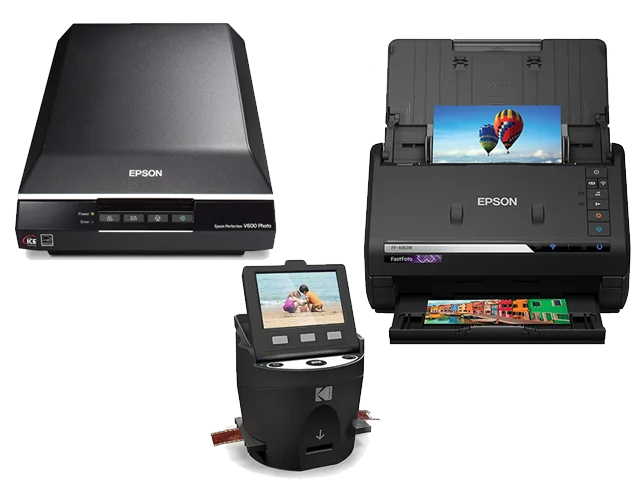
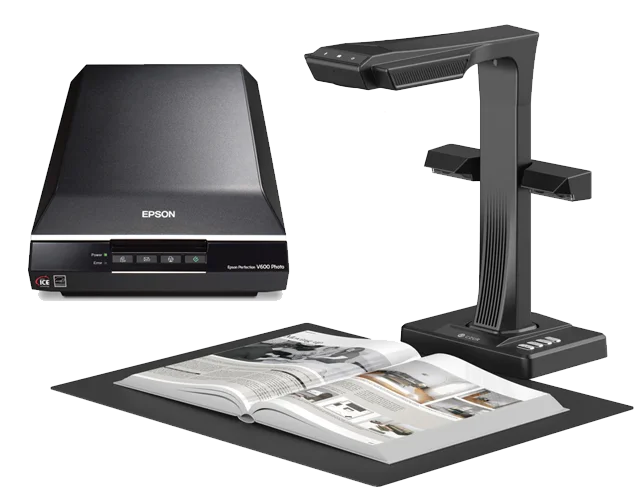
Our Epson V600 Flatbed Scanners are capable of scanning photos, slides, and negatives. The scan bed can accommodate photos or documents up to 8.5" x 11.7".
If you're scanning a large number of photos, try the Epson FastFoto. It can quickly scan up to 36 photos at a time. The FastFoto can accommodate Polaroids, panoramas and postcards up to 8" x 10".
The Kodak Scanza converts 35mm, 126, 110, Super 8, and 8mm negatives and slides to JPEG digital files and is available upon request.
A Logan Electric E-Z Slide Sorter is also available upon request.
Film, Video Cassettes & Audio Cassettes
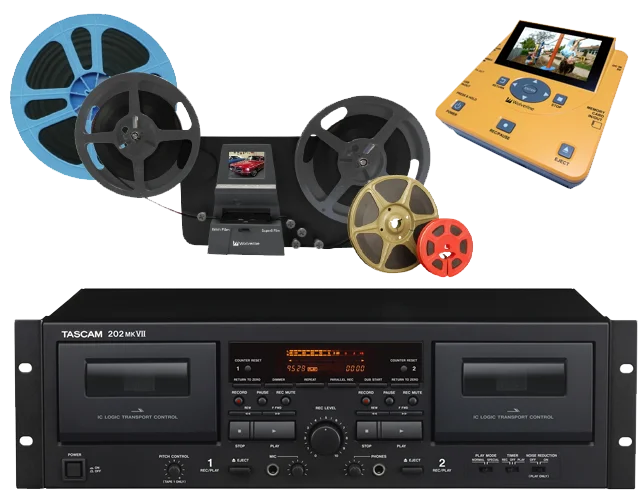
Preserve your old home movies on VHS, VHS-C and Hi8 cassette or 8mm, 16mm or Super 8 film as sharable digital files with equipment available upon request.
The Wolverine MovieMaker PRO can convert 8mm and Super8 film in 5" or 3" reel to digital files. It's a standalone machine, no computer required. Requires a SD/SDHC memory card up to 32 GB.
Wolverine TransMedia can convert tapes from an attached VHS player or camcorder to MP4 digital files. You can save to USB flash drive, SD card, or DVD. You can also transfer files from different digital storage media, e.g. DVD to flash drive.
The Tascam 202MKVII Dual Cassette Deck Recorder (included with Memory Lab 1) allows you to convert audio cassette tapes to high-quality MP3 files with audio recording software such as Audacity.
Other audiovisual equipment includes a VCR, Maxell VHS-C Adapter, Hi8 Camcorder, Mini DV Camcorder.
Software for audiovisual transfer includes HandBrake and Audacity.
Books & Documents
The CZUR ET24 Professional Book Scanner (included with Memory Lab 2) allows you to scan materials up to 16.5" x 11.7" and 320 DPI resolution. It uses pixel-level transformation to flatten curved pages, creating clean, flat scans – even when your book won't stay flat. The book scanner is great for:
- Large maps, oversized books and accounting ledgers
- Old newspapers, magazines and other periodicals
- Scrapbooks
- Delicate or oversized artwork for high-quality prints or online galleries
- Digital copies of self-published zines and comics
- Bound and stapled documents like contracts
For flat items, our Epson Perfection V600 scans materials up to 8.5" x 11.7" and 6400 DPI.
Our computers include CD/DVD drives. An external floppy disk drive is also available upon request.
Related Services & Resources